How to Share a Travel Itinerary With People Who Don’t Use Your App
Start with what the recipient needs to know
“What time are we leaving?” “Which hotel?” “Can you send the plan again?” These questions often mean the itinerary exists, but not in a format people can find and use.
Before exporting, decide who will read it. Friends joining a weekend need meeting points and times. Parents may prefer a larger, readable document. A travel creator sharing a route publicly should remove personal bookings and contact details. The same file rarely suits all three audiences.
Include the trip dates, destination, daily sequence, meeting locations, and which plans are tentative. Add the timezone when timing could be ambiguous. Include a booking reference or contact only when that recipient actually needs it and it is safe to send. The aim is to answer the next practical question, not to distribute every field you collected.
Choose an image, PDF, or calendar file
An itinerary image is useful in a group chat or direct message. People can open it quickly or save it to Photos. Long trips may need multiple images; check that the text remains readable on a phone. Include all relevant pages rather than assuming the first image contains the entire trip.
A PDF is useful for a multi-day document that people may save, search, or print with a compatible viewer. Preview it on a small screen before sending, especially if a plan has a long name or detailed location.
An ICS calendar file is useful when someone wants dated events in a calendar app that supports importing it. It is a one-time import, not an automatically updating subscription. Re-importing a revised file may create duplicates, depending on the calendar app. Explain what changed before asking someone to import again.
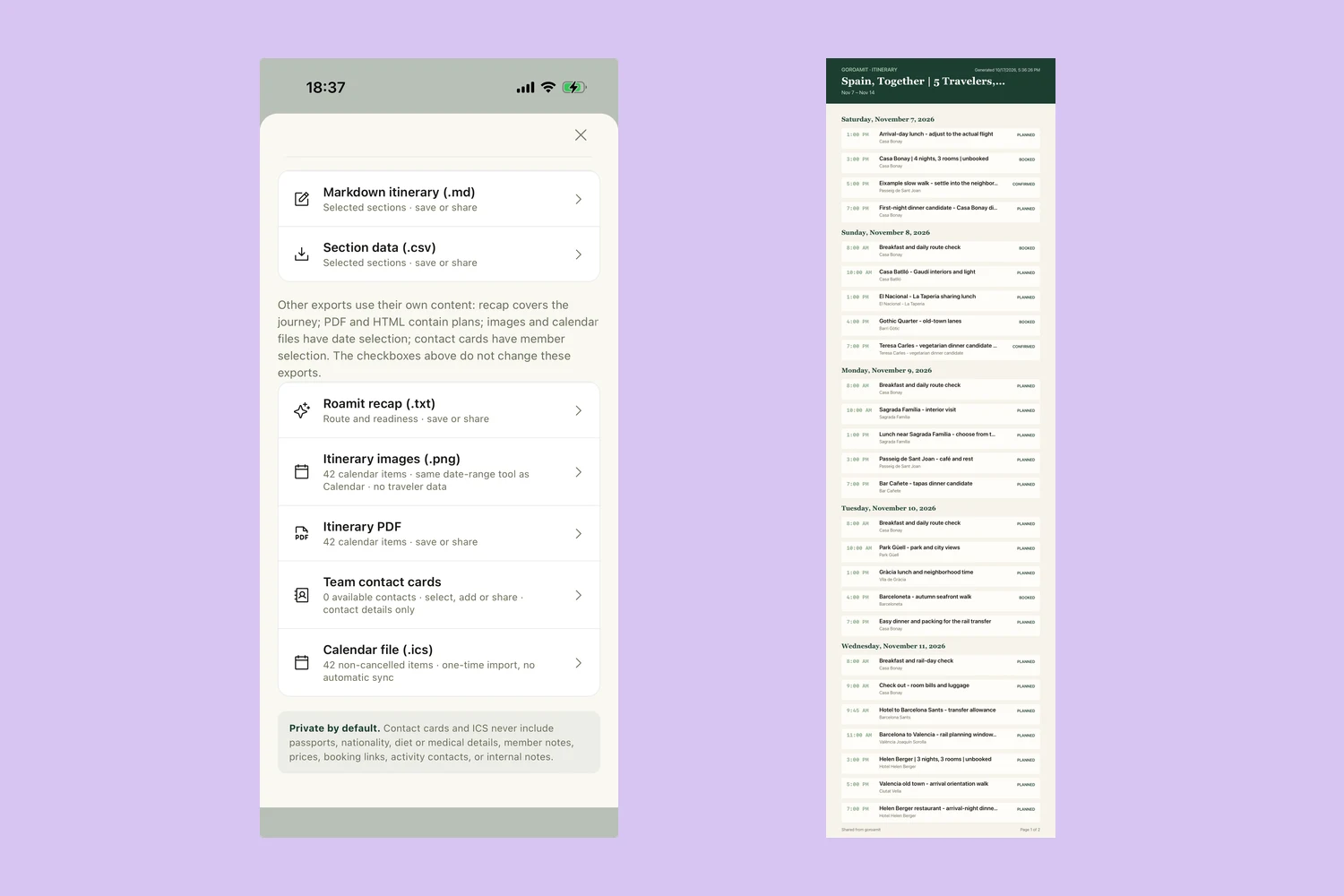
GoRoamIt offers these export options. Markdown and CSV serve other needs, such as editing text or inspecting structured section data; they are not interchangeable with a polished itinerary document.
Export a readable copy from GoRoamIt
Open your trip’s sharing and export options. Choose Itinerary images (.png) or Itinerary PDF for a copy that recipients can read without GoRoamIt. For images, use the date-range selection to focus on the part of the journey you want to send.
Save the output first and open it as a recipient would. Check that the dates are correct, the activity titles make sense, the itinerary includes the intended days, and the relevant pages are present. Then share the saved copy through the messaging or file-sharing channel you already use.
The sharing menu also includes Markdown itinerary, section CSV, a text recap, contact cards, and a calendar file. Different exports use different content and selection controls. In particular, section checkboxes for Markdown and CSV do not filter every other export. Check the format you actually intend to send rather than relying on a previous selection.
Keep traveler information out of public copies
A useful itinerary does not need a passport scan, a person’s medical notes, or their full booking credentials. Keep those details separate, even if the trip itself is going to friends.
GoRoamIt’s contact-card and ICS exports exclude sensitive traveler fields such as passport, nationality, dietary or medical details, and member notes. That safeguard is specific to those export types. It does not mean every export has identical contents, or that your own activity titles and notes cannot reveal something private.
Review the finished file before posting it in a large group or on social media. For a public travel-creator itinerary, remove private addresses, personal contact details, payment information, and reservation identifiers. Consider sharing the route after the trip rather than announcing where a group will be at a precise future time.
Local-first planning lets you keep the working trip on your device. Once you send a file through another service, that service and its recipients handle the copy. See the GoRoamIt privacy policy for the app’s own data handling.
Treat every export as a dated snapshot
A shared file does not change when you edit the original plan. Give each version a clear name, such as “Barcelona itinerary, updated October 17,” and put a short change summary in the accompanying message.
For example: “Here is the updated Saturday plan. Lunch is now at 1:30. Please use this image instead of yesterday’s.” If the update affects only tomorrow, a focused day export may be easier to read than resending the entire week.
Do not describe exported files as live collaboration or automatic calendar sync. GoRoamIt’s static sharing is suited to an organizer maintaining a plan and sending readable copies. If everyone must edit the same itinerary simultaneously, you need a workflow that explicitly supports that. Choosing the right sharing model early avoids confusion later.
Send the itinerary with one useful message
Try this group-chat template:
Here is our latest trip plan, updated [date]. It includes our daily activities and meeting points. Tentative plans are marked. Save this copy for the trip, and use it instead of earlier versions. The main change is [change].
For a public route, add the context people need to adapt it: who the pace suits, how many days it covers, and which choices depend on reservations or opening hours. Check current details with the venue before presenting them as reliable travel advice.
GoRoamIt is available in public beta for iPhone and iPad, with English, Simplified Chinese, Spanish, French, Japanese, and Russian interfaces. Install Apple’s TestFlight, then accept the beta invitation. No GoRoamIt registration is required. If you are still building the plan, start with our group trip planning guide or download a blank trip template.
A good handoff gives people enough information to enjoy the trip without turning every question into another message to the organizer.