How to Plan a Group Trip Without Becoming Everyone’s Travel Manager
Agree on constraints before collecting places
Someone suggests Barcelona. Someone else sends twelve restaurant links. Before long, you have a busy group chat and no actual decisions. The useful first step is not adding more ideas. It is agreeing on what the trip needs to work for everyone.
Confirm dates, departure cities, a realistic spending range, walking pace, and anything that affects bookings. Ask about accessibility and food requirements privately rather than inviting people to post health information in a shared chat. For a family trip, leave space for rest. For friends with different budgets, agree on which activities are optional.
Write a short brief: “Five travelers, seven nights, three rooms, two cities, one relaxed activity each morning.” This becomes a filter for later decisions, not a promise to fill every hour.
Make rooming and budget assumptions explicit
“Three rooms” is not enough information to book a hotel. Five travelers might mean two pairs and one solo room, but you still need to confirm who shares, which bed arrangements work, and whether the solo room changes the cost.
Separate an estimate from a confirmed booking. Keep the number of nights, room count, currency, and whether a price covers the group or one person beside the accommodation plan. Otherwise, a seemingly cheap hotel can quietly become the biggest misunderstanding of the trip.
GoRoamIt keeps traveler details, plans, and a group budget in the same local workspace. You can refer to rooming notes while organizing a stay. Its budget view helps you review planned costs; it is not a replacement for a payment service or an agreement about who owes whom.
Build each day around a few anchors
Start with arrivals, departures, check-in, and reservations that genuinely have fixed times. Add one main activity, nearby food options, and space between them. A transfer day should look different from a full sightseeing day.
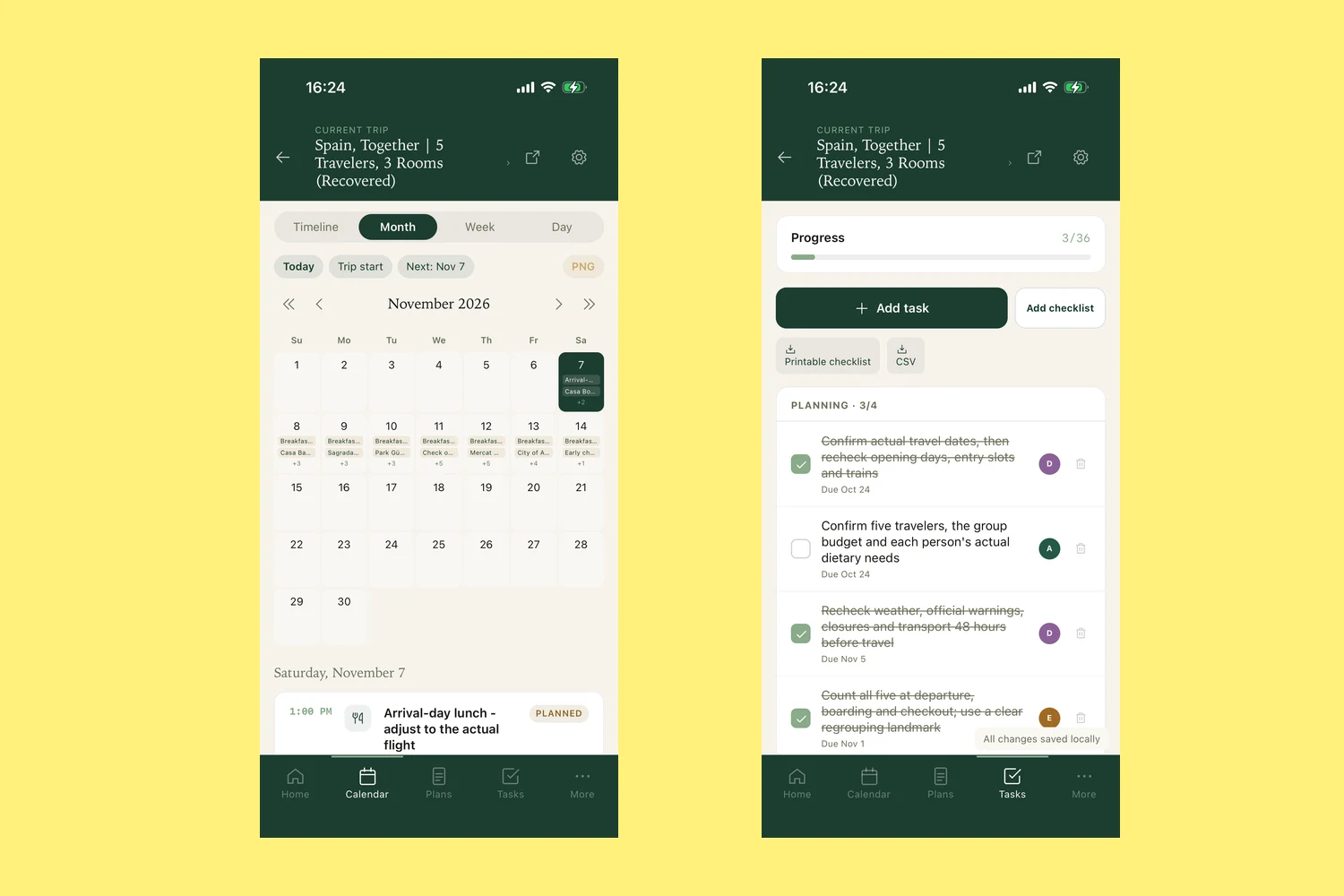
For example, an arrival day might contain lunch, hotel check-in, a neighborhood walk, and dinner. If the flight changes, you can adjust a handful of plans instead of rebuilding a packed schedule. Mark restaurant candidates as tentative so nobody mistakes a suggestion for a reservation.
In GoRoamIt, month, week, day, and timeline views show the same trip from different angles. Use the month view to check the overall shape, then a day or timeline view for sequence and timing. A timeline shows your chosen order; it does not automatically optimize the route or account for every transfer.
Give preparation tasks an owner
If everything is “someone should do this,” the organizer usually becomes that someone. Turn each loose end into a specific task: check baggage allowances, confirm a restaurant’s dietary options, or find the station-to-hotel transfer.
Agree on an owner and a useful deadline. “Check the rail options by Friday and send two choices” is easier to act on than “sort transport.” Keep these tasks separate from activities that belong on the travel calendar.
GoRoamIt can record task assignments and completion for your planning. Assigning a name does not create a shared online workspace or automatically send work to another person. Ask them in the channel you already use, then keep your planning record up to date. The benefit is a clearer handoff, not another chat to maintain.
Choose a tool that fits the way your group travels
A shared document may be enough for a simple weekend. A spreadsheet works well when the main problem is comparing costs. A dedicated trip planner is useful when daily plans, places, traveler preferences, preparation tasks, and booking links keep getting separated.
GoRoamIt is a local-first travel planner for iPhone and iPad, designed for solo travelers and organizers coordinating groups of up to 20 people. You do not need a GoRoamIt account. Trip records are stored on your device; online features, including weather, maps, and remote images, can contact their providers. Read the product privacy policy for the detail rather than treating local storage as a promise of zero network use.
The app supports English, Simplified Chinese, Spanish, French, Japanese, and Russian. You can try the public TestFlight beta by installing Apple’s TestFlight first. For a file-based starting point, use the blank trip template and field guide. The goal is a trip you can enjoy too, not a perfectly filled calendar.